01

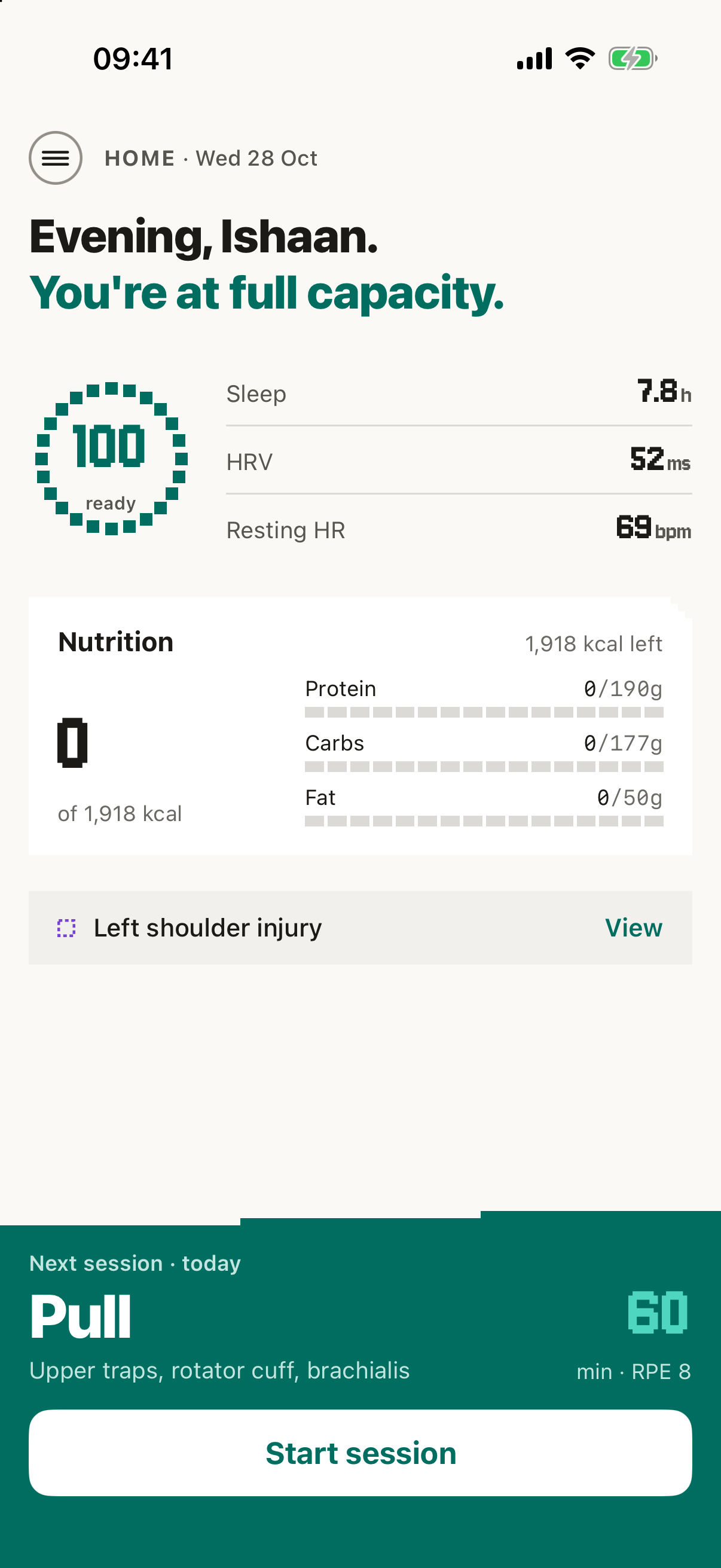
Today's session, already planned.

  • Your coach plans every session around your recovery, goals, sleep and equipment
  • Open the app, pick how long you've got, and go
  • Saved set-ups for the days you want the same thing
See the detail

Training: a session
Recovery and readiness
02

Rest right. Lift better.

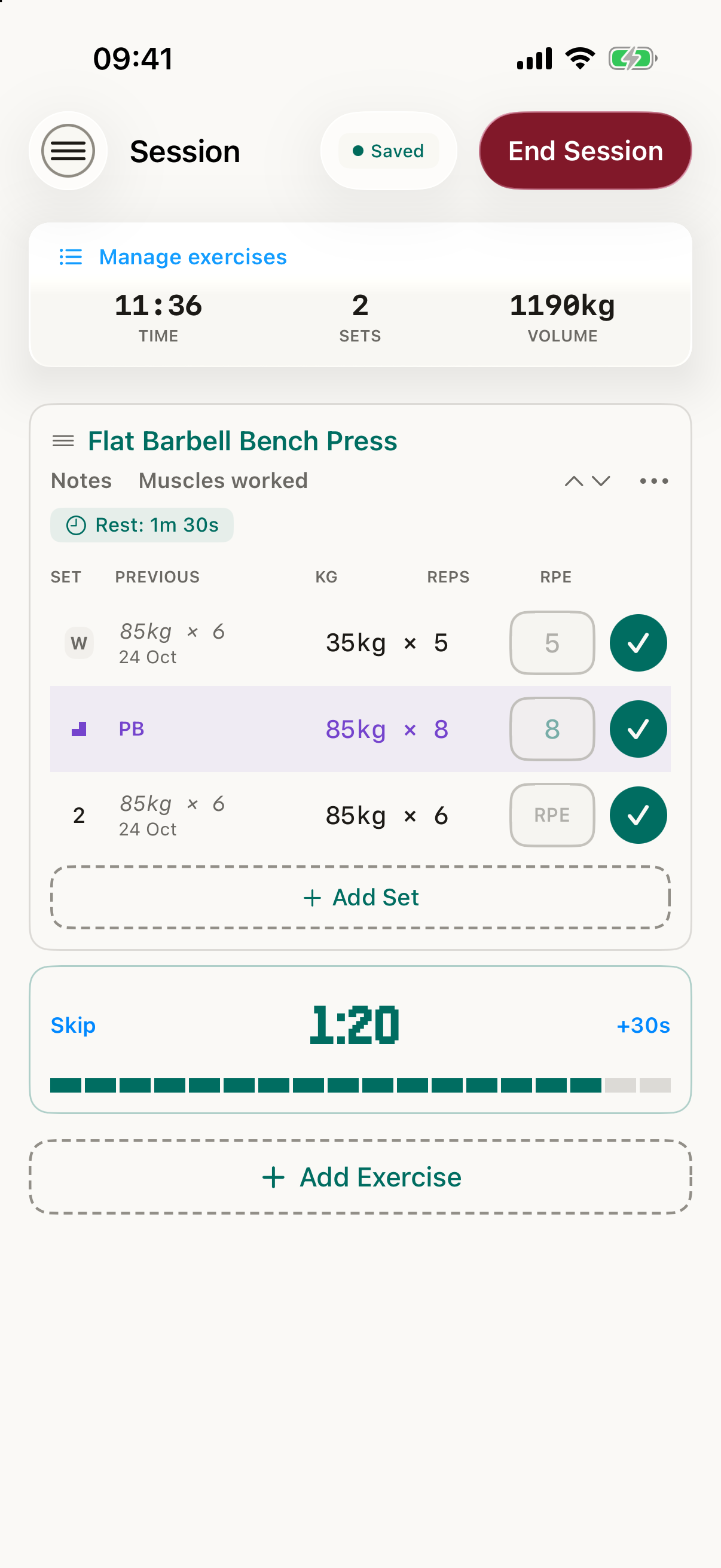
  • Tick off a set and your rest timer starts
  • It follows you to your Lock Screen, Dynamic Island and wrist
  • A nudge when it's time, even with your phone locked

See the detail

03

Your workout, on your wrist.

  • Log sets, change weights and control rest without unlocking your phone
  • Turn the Digital Crown, tap the tick, set logged
  • Every session saved to Apple Health

See the detail

04

Is cardio holding your lifts back?

  • Heart rate on every set, and whether you recovered between them
  • A plain-English verdict at the end of the session
  • On rough days your coach eases off before you burn out

See the detail

05

Run, ride, lift. One plan.

  • Track runs, rides and walks with GPS: distance, pace and route
  • Your cardio and your lifting planned so they work together
  • Cardio goals that track themselves

See the detail

06

Train around injuries, not through them.

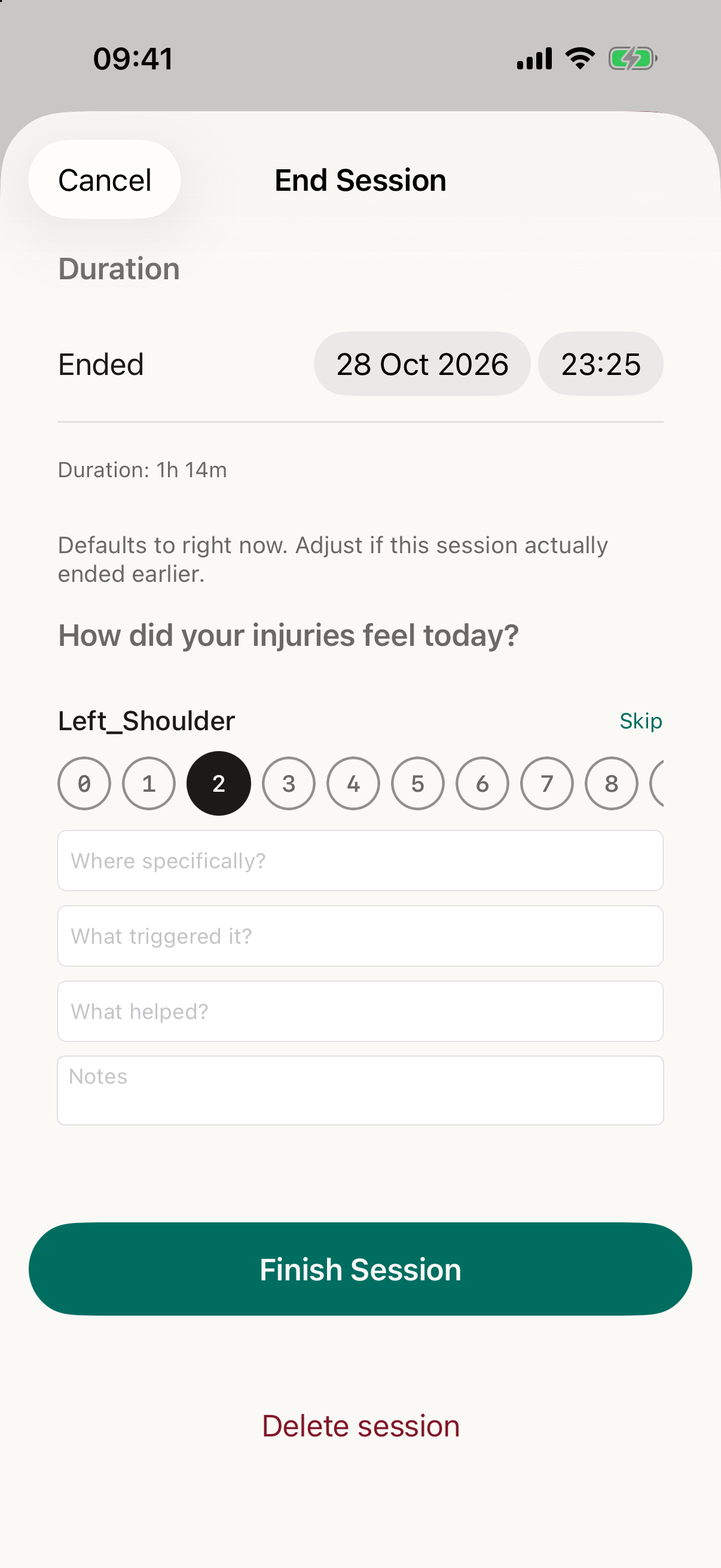
  • Log an injury and your sessions work around it, starting with the next one
  • A personal rehab plan in about 15 seconds
  • Rehab built into every workout

See the detail

Logging pain
07

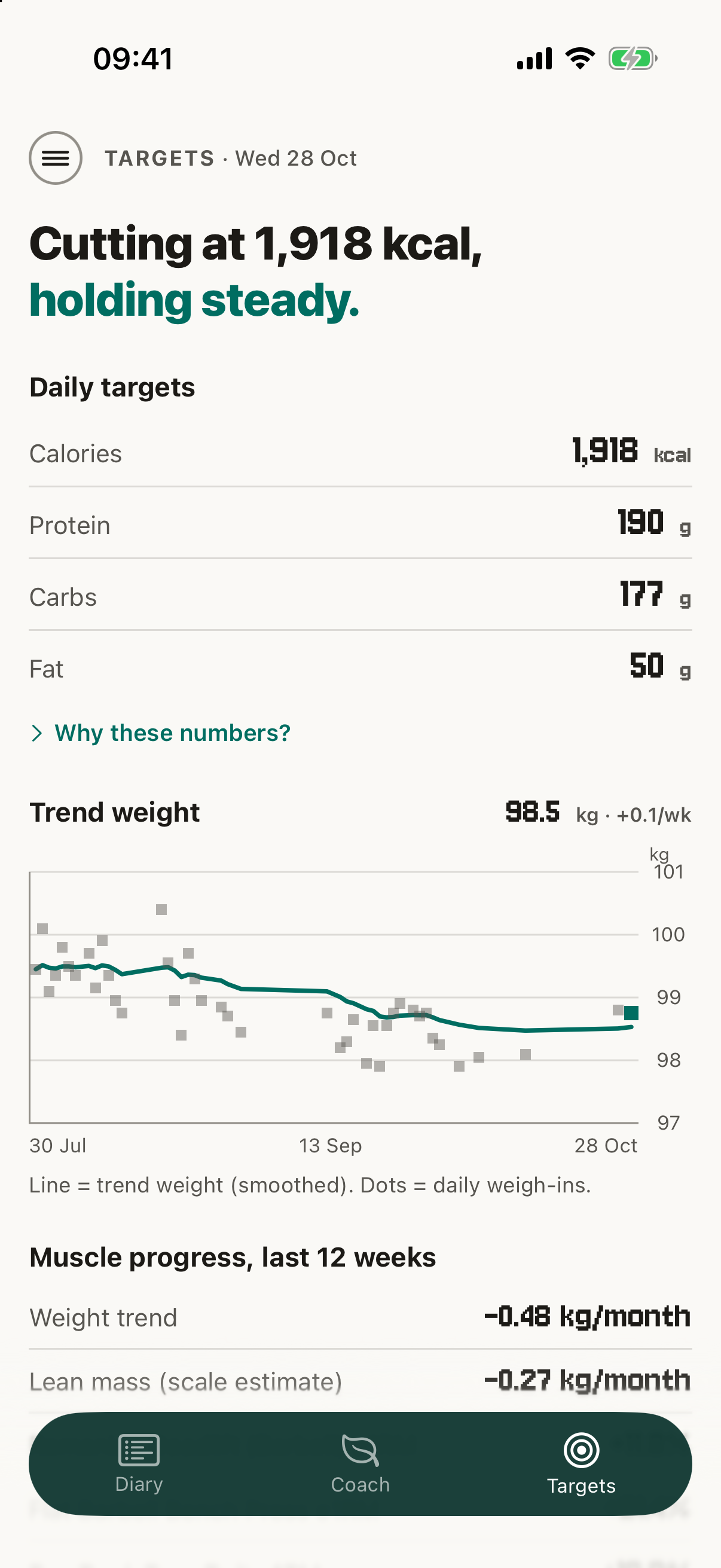
Eat for the training you do.

  • Calorie and macro targets built around your body and training
  • Scan a barcode, log meals, reuse saved meals
  • Weekly check-ins adjust your targets to your real results
See the detail

Nutrition: today's targets
08

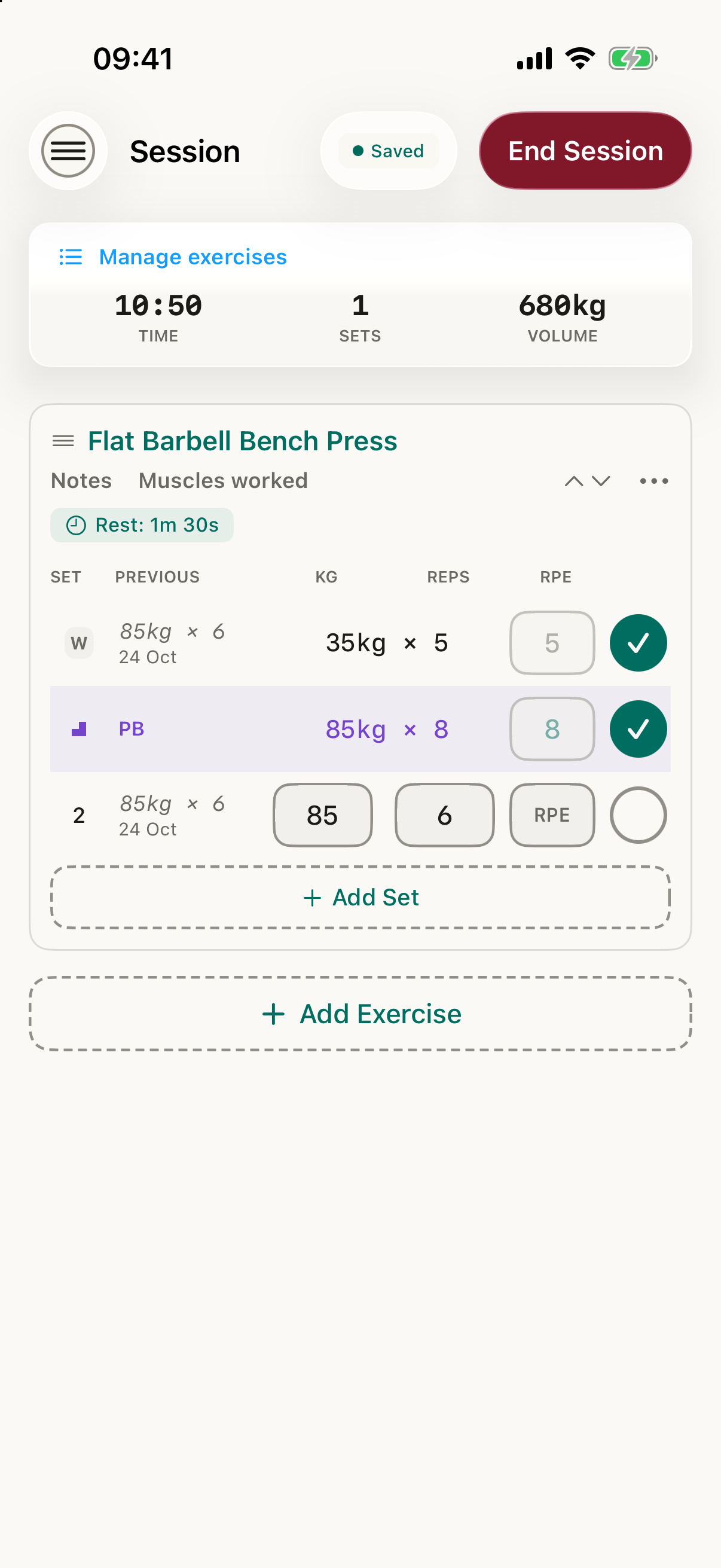
Every PB, celebrated.

  • Spotted the moment they happen, on weight, reps or hold time
  • Bigger milestones get bigger celebrations
  • A goal reached gets the biggest moment
See the detail

A PB celebration
09

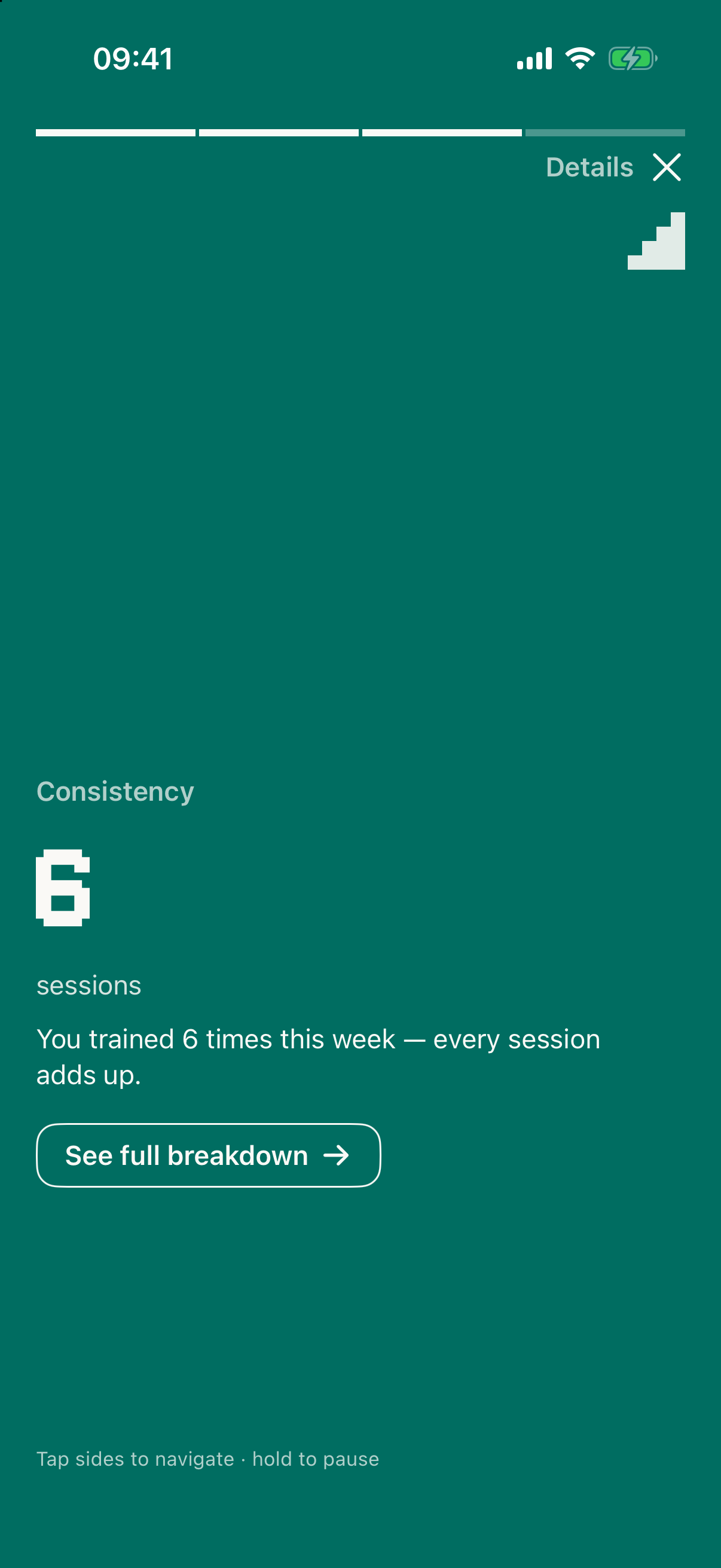
Your week, in a swipe.

  • A Stories-style recap: progress, PBs, recovery and what's next
  • What moved, what stalled
  • One thing to do next

See the detail

The weekly review

How it stacks up.

Price, training, food, recovery and community, next to the apps people use today.

FeaturePixelPTMacroFactorCarbon Diet CoachMyFitnessPalHevyFitbod
Price and access
Price£10 a month, forever, on the waitlist. Higher after launch$11.99 a month or $71.99 a year. Workouts app is separate, or $89.99 a year for both$11.99 a month, $59.99 for six months, $99.99 a yearPremium is $19.99 a month or $79.99 a year, with a 7-day trialFree to use. Hevy Pro is an optional paid upgrade, monthly, yearly or lifetimeAbout $12.99 to $15.99 a month, $79.99 to $95.99 a year
What the free version gives youTo be decidedFree trialFree to downloadYes: nutrition, weight and exercise tracking. Barcode, Meal Scan and macro goals need PremiumYes, with limits: 4 routines, 3 months of history, 7 custom exercisesFree trial
PlatformsiPhone and Apple Watch, in developmentiOS and AndroidiOS and AndroidiOS and AndroidiPhone, iPad, Apple Watch and AndroidiPhone and Apple Watch, plus Android
Planning your training
A session planned for you each timeYes, from your time, equipment, recovery and injuriesSeparate Workouts appNo, not a workout appNo, exercise tracking onlyHevy Trainer plan generator. Otherwise you build routinesYes, from goals, equipment, history and recovery
Choose your time and placeYes, 15 to 120 minutes and saved equipment profilesNot listedNoNot listedNot listedYes, equipment profiles
Loads suggested from last timeYes, sized to the liftSeparate Workouts appNoNot listedShows previous workout valuesNot listed
Goals tracked from your logsYes: strength, body composition, cardio, injury and habitWeight goalYes, goal trackerCalorie and custom macro goals (Premium)Not listedNot listed
Logging a session
Set loggerYes, with supersets, warm-ups and offline useSeparate Workouts appNoNot listedYesYes
SupersetsYesNot listedNoNot listedYesNot listed
Rest timerYes, on the Lock Screen and Dynamic IslandNot listedNoNot listedYes, automaticNot listed
Exercise libraryYes, with variations by grip, stance and equipmentNot listedNoNot listedYes, plus custom exercisesYes, with demos and form cues
Personal bestsYes, celebrated by tierNot listedNoNot listedYes, live PR notificationsNot listed
Apple WatchYes, log sets, rest timers and heart rateNutrition app on watchOSNot listedYes, among 35+ synced apps and devicesYes, log sets and rest timersYes
Social and community
Follow friends and a feedNot yetNot listedNot listedNot listedYesNot listed
Leaderboards and comparing liftsNot yetNot listedNot listedNot listedYesNot listed
Share workouts and progressNot yetNot listedNot listedNot listedYes, photos, videos and shareable imagesNot listed
Human coach platformNo, the AI is the coachNot listedNot listedNot listedYes, Hevy CoachNot listed
Nutrition
Adaptive calorie and macro targetsYes, from expected versus actual weight trendYes, from intake and weight trendYes, at weekly check-insNot listedNoNo
Cut, maintain, gain, reverseYes, plus recompYesYesNot listedNoNo
Weight trend, not the daily numberYes, with expected swings markedYesYes, charts for weight and body fatWeight trackingBody measurementsNo
Food loggingYes: search, barcode scanning and quick addYes, large verified databaseYes, large database, quick add, favourites and recipesYes, with Voice Log (Premium)NoNo
Barcode scanningYesYesYesYes, Premium onlyNoNo
AI photo food loggingNot yetYesNot listedYes, Meal Scan (Premium)NoNo
Recovery and injuries
Recovery data shapes the planYes, sleep and heart rate from Apple HealthNot listedNot listedNot listedNot listedYes, recovery feeds workout generation
Injury log and pain feedbackYes, one tap after a sessionNot listedNot listedNot listedNot listedNot listed
Exercises change around an injuryYes, with rehab work addedNot listedNot listedNot listedNot listedNot listed
Body map: injuries and balanceYes, My BodyNot listedNot listedNot listedMuscle distribution chartsNot listed
Progress and review
Weekly reviewYes, a short swipeable reviewWeekly target adjustmentsWeekly check-insNot listedMonthly reportsNot listed
Progress chartsWeight trend and goal progressYesYes, weight, body fat and macrosNutrition and weight trackingYes, muscle group charts and monthly reportsNot listed
Reads Apple HealthYes, sleep, heart rate, steps, weightNot listedYes, weight and body fatSyncs with 35+ apps and devicesExports workouts to HealthYes

Competitor details are from each app's public website and App Store listing, checked on 28 and 29 October 2026, and may have changed. Prices are US dollars and vary by country. "Not listed" means we found nothing on its site or App Store listing, not that the feature is absent. PixelPT is pre-launch.

Where others are ahead.

  • Social. Hevy has a feed, leaderboards and sharing. We don't yet.
  • Photo food logging. MacroFactor has it. We don't yet.
  • Android. Everyone else is on it. We're iPhone only for now.
  • Track record. They have millions of users. We're pre-launch.

See the roadmap

Every feature, in detail.

Training

Sessions built around your day

Choose 15, 30, 45, 60, 90 or 120 minutes. Short sessions cover more muscle groups with fewer sets. Long sessions get full volume and a proper warm-up.

Pick a saved equipment profile, or make your own for the hotel gym. Exercises are filtered to what you can actually use.

Loads sized to the lift

Suggestions treat a barbell squat and a lateral raise differently. Jumps are a share of working weight and depend on how long you've been progressing on that specific lift.

Sleep, recovery and your calorie trend nudge how confident a suggestion is. Sets logged late in a session are read with that fatigue in mind.

A logger that stays out of the way

  • Table layout with previous performance beside each set
  • Warm-up, working, drop and failure sets
  • Supersets with colour-matched cards, alternating or sequential
  • Timed sets for planks and holds
  • Rest timer with a push notification when the app is in the background
  • Works offline and syncs when you're back online
  • A typo guard that asks "did you mean 60.1 kg?" before saving 601

Goals that track themselves

Set strength, body composition, cardio, injury and habit goals. Progress is calculated from your logs. Strength goals compare estimated one-rep max, so "bench 50 kg for 8" is judged fairly against what you've lifted.

You can also set weekly set-volume targets per muscle and choose whether each is about volume or progressive overload.

Celebrations that match the moment

A routine personal best gets an inline PB badge. A milestone gets a burst on that set. A goal reaching 100% gets the biggest moment in the app. A same-weight-but-easier set is recognised too, because it's progress.

A weekly review you'll finish

A story-style review of four to six cards, chosen by what mattered that week. Tap through in under a minute, or open the full written breakdown.

Smart rest timers

Rest exactly as long as you should, without watching the clock.

Starts on its own

Tick off a set and your rest timer starts automatically, right under the exercise you just finished.

The right rest for each exercise

Your coach suggests a rest time for every exercise. Change it any time, from no rest up to 4 minutes. Tap +30s for a longer breather, or Skip to go straight into your next set.

Knows what's next

In a superset, the timer tells you which exercise is coming up. It changes colour for the final 10 seconds, and your phone buzzes when rest is over.

Follows you everywhere

The countdown shows on your Lock Screen and in the Dynamic Island. Even with your phone locked, you get a "Rest complete" alert telling you which exercise is next. Your Apple Watch shows the same countdown, with Skip and +30 buttons and a tap on your wrist when it's time to go.

Hold timers

Planks, hollow holds and stretches get their own countdown. Press play, hold, and the set logs itself when time's up.

A session clock that stays honest

See how long you've been training on your phone and your watch. If a session is left open for hours, PixelPT closes it at the time you were last active, so your history stays accurate.

Apple Watch app

Leave your phone in your bag. Your whole workout is on your wrist.

Start from your wrist

Tap "Start Recommended" for today's planned session, or "Start Blank Workout" to do your own thing. Your phone sets everything up for you, and offers to open the session on your watch with a single tap.

Always on the right set

The watch follows your workout automatically, supersets included, and jumps to whichever set you're on. See what you did last time ("prev 80 kg x 8") so you know what to beat.

Adjust with the Digital Crown

Turn the Crown to change the weight in 2.5 kg steps, or the reps, then tap the tick to log the set. Add extra sets, mark warm-up, drop or failure sets, and undo a set you logged by mistake.

Live stats

Elapsed time, heart rate, calories burned, sets done and total volume lifted, with the rest timer and hold timer on your wrist.

Finish from the watch

One tap finishes your workout. Discard asks you to confirm first. Every session is recorded in Apple Health as a workout, so it counts towards your Activity rings.

Heart rate coaching

Find out whether your fitness is holding your strength back.

Heart rate on every set

Wear your Apple Watch and your heart rate shows live on your wrist and your phone. Each set you log records your peak and average, plus how high it still was when you started the set.

Recovery between sets

PixelPT checks whether your heart rate came back down properly during each rest. It compares against a target based on your age from Apple Health, or against your own peak for the day if your age isn't shared.

Your cardio load summary

At the end of the session you get your peak and average heart rate, a chart of every set, and a plain-English verdict: either that cardio doesn't look like the limiter today, or a heads-up when it was.

It shapes your next sessions

If your heart rate keeps failing to recover across several sessions, your coach tells you and leans towards lower-intensity work.

Daily heart health

Resting heart rate, HRV and VO2 max from your Apple Watch feed a daily readiness check. If your resting heart rate is up or your sleep is short, your coach lowers the intensity for the day.

Cardio and GPS tracking

Cardio that fits around your strength training, not on top of it.

GPS tracking

Track runs, rides and walks with GPS. PixelPT records your distance, time and pace as you go, and saves every outdoor session with your route on a map.

Coach-planned cardio

Choose a cardio day and your coach builds it from running, cycling, rowing, swimming, walking and HIIT. Or add a short cardio finisher to the end of any session.

Built into your week

Cardio is part of your training rotation, and your coach makes sure it doesn't crowd out strength work you're overdue on. It sits alongside strength, sleep and recovery in your weekly review.

Goals that track themselves

Set a faster 5k or a longer distance. Your logged runs and rides count towards it, and your goals help shape which sessions your coach suggests.

Fuelled and injury-aware

The more cardio you do, the more carbs PixelPT makes sure you're eating to fuel it, with a warning if your own macro choices drop too low. Knee and hip injuries are flagged before a cardio session.

Nutrition

Built for people who want a target that responds to results, with guardrails against crash dieting.

A food diary that is quick to use

Search a large food catalogue, scan a barcode, or quick-add calories and macros. Your most used amounts are remembered.

Trend weight

Daily weight is smoothed so a salty dinner or a hard leg day doesn't read as fat gain. You see the direction of travel, not the noise.

Your own maintenance number

Formulas start the estimate. As you log, PixelPT works out your real expenditure from intake and weight change, and leans on that more with every clean week.

Targets that correct themselves

Protein is the anchor, fat is a floor, and carbs flex around training. When the trend differs from the plan, the target adjusts. Lifestyle context such as alcohol, sleep and travel is considered before blaming your metabolism.

Cut, maintain, gain, reverse, recomp

Each is a distinct mode with its own rules. Reverse dieting is framed as a structured return to maintenance, because the evidence for it as "metabolic repair" is thin. Here's what the research says.

Weekly check-ins

Each week your check-in looks at what actually happened and adjusts your targets to match your real results.

Fuel for your training

Your nutrition knows about your training. Add more cardio and your carbs rise to match, so you're fuelled for the work you're doing.

Guardrails

Calculated targets respect an energy-availability floor, and rate-of-change advice tightens as you get leaner. You choose your pace and we show you the guidance, we don't gamify it.

Injuries and recovery

An injury log that gets used

Record each injury with location and severity. Active injuries are pulled into every session plan, and resolved ones drop out automatically.

Pain feedback after sessions

A short check at the end of a session captures pain level, what triggered it and what helped. Over time that becomes a pattern, not a vague memory.

Analysis and rehab

Ask for an analysis and you get likely contributing factors, affected muscle chains, a trend, and a rehab protocol with where to feel each movement and how to do it. High-priority rehab work is added to your sessions.

Flag pain any time

Felt a twinge during a set, or woke up sore? Flag pain mid-workout or any time outside a session. Serious injuries are kept out of your sessions entirely, and milder ones are trained gently.

Rehab inside every workout

Your most important rehab exercises are added to your sessions for you, so recovery happens while you train. Analysis takes about 15 seconds and includes exercises to avoid and safer ways to do the ones you love.

"Feeling better?"

After two pain-free check-ins in a row, PixelPT suggests marking the injury as healed. You can always reopen it.

See it on your body

Injured areas are outlined on your body map, and any muscle goals for that area pause until it clears. You can also set an injury goal like "pain-free" and track your progress towards it.

Recovery milestones, quietly

A longer pain-free streak on a movement gets a calm acknowledgement, not confetti.

PixelPT isn't a diagnosis. If pain is sharp, getting worse, or doesn't settle, see a clinician. More on that in the health disclaimer.

And the rest

Fast, simple logging

Supersets, a warm-up calculator, and a check that catches typos like 800 kg instead of 80 kg before they're saved.

Works offline

Keep logging in a basement gym with no signal. Everything syncs when you're back online, and an interrupted session can be picked up where you left off.

Your full history

A calendar of every session, stats and trends, and a strength chart for every exercise.

My Body

A muscle map showing which areas are recovered, recovering, under-trained or injured, plus quick soreness check-ins.

Getting started

Sign in with Apple or Google, then a guided tour.

What it connects to

Apple Health

Sleep, heart rate variability, resting heart rate, VO2 max, steps and body measurements flow in automatically and feed the readiness and recovery side of the coach.

iPhone and Apple Watch

A native iPhone app with an Apple Watch app alongside it, built in SwiftUI and in development now.

1-1, 24/7 coaching for £10 a month, forever.

Join the waitlist to lock in £10 a month. The price goes up after launch. We'll email you once, when testing opens.